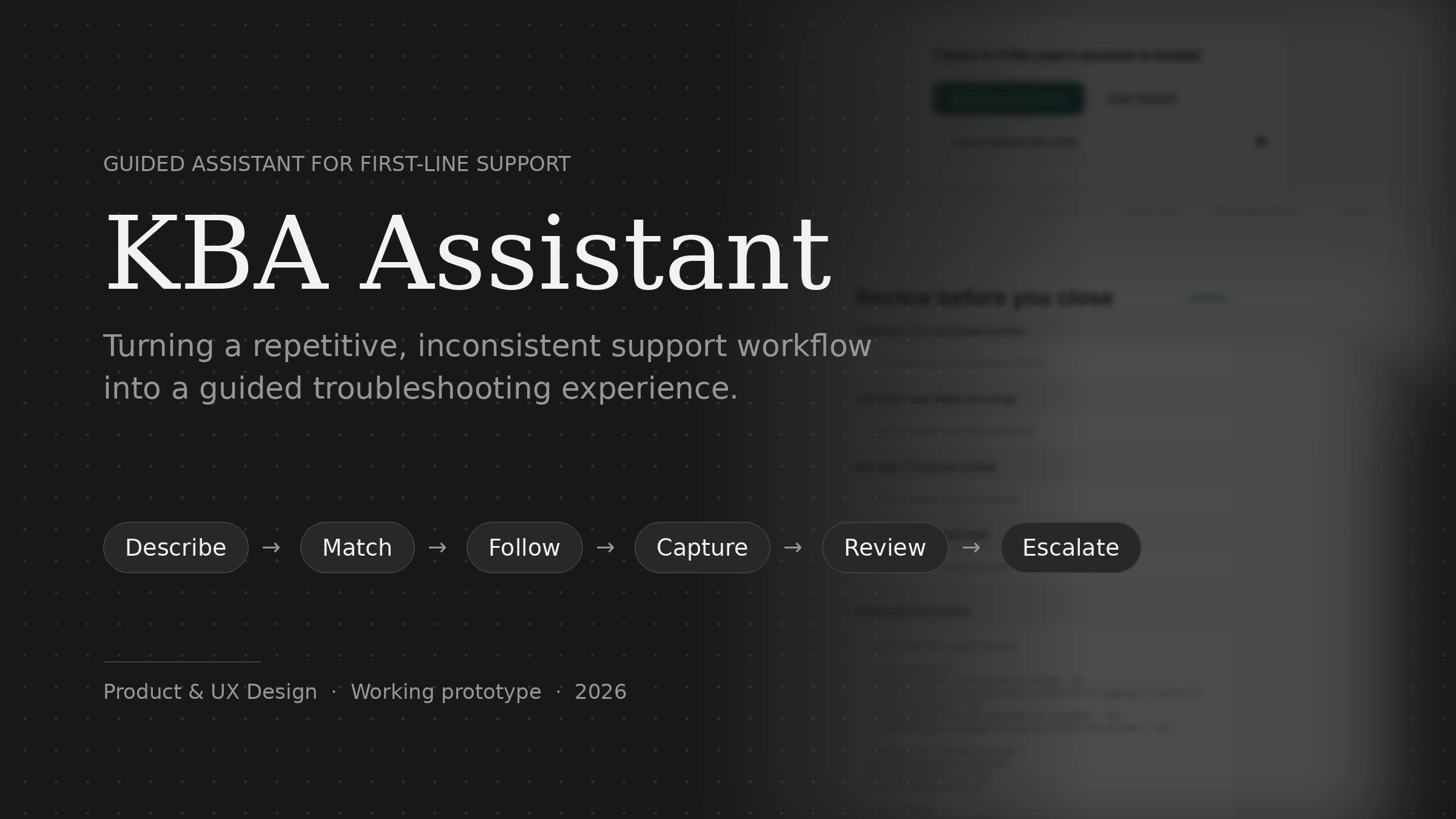
Guided Assistant for First-Line Support
KBA Assistant
Turning a repetitive, inconsistent support workflow into a guided troubleshooting experience.
- Role
- Product & UX Design
- Year
- 2026
- Team
- Solo project
- Status
- Working prototype
01 · The Context
I knew the problem because I was part of the queue.
In a first-line support environment, analysts handle user calls, understand the problem, troubleshoot using Knowledge-Based Articles (KBAs), document what happened, and escalate unresolved issues to second-line support.
On paper, the process is straightforward. In practice, the same issue could be handled very differently depending on which analyst picked up the call. An analyst might:
- Search through multiple KBAs before finding the right one.
- Remember some troubleshooting steps instead of following the procedure exactly.
- Skip a step when working under time pressure.
- Document the incident differently from another analyst.
- Miss a piece of information required by second-line support.
The result was a familiar pattern:
The individual mistakes were small. The accumulated operational cost was not.
02 · The Problem
The process depended too much on the individual analyst.
I identified four recurring problems in the workflow.
01
Finding the right KBA was slow
The knowledge base had grown beyond what an analyst could reasonably remember. When an unfamiliar issue came in, the analyst had to translate the user’s description into the terminology used by the knowledge base and then search for the relevant procedure.
02
Troubleshooting relied on memory
Even after finding the correct KBA, analysts often knew parts of the procedure from experience. That created variation. Two analysts handling the same issue could perform different checks, in a different order, and reach the same — or different — outcomes.
03
Documentation happened under pressure
Ticket descriptions were usually written at the end of the call. The analyst had to remember what they had done and quickly explain it in their own words — creating differences in language, structure, level of detail and information captured.
04
Incomplete tickets created passbacks
A missing device number, status, duration, troubleshooting step, or other important detail could result in second-line support sending the ticket back. The analyst then had to revisit the incident and collect information that could have been captured during the original call.
03 · The Core Opportunity
The problem wasn’t simply:
“Analysts need a better way to search KBAs.”
The deeper problem was that the process itself was inconsistent. So instead of building another knowledge-base viewer, I explored a different question:
What if the KBA became an interactive troubleshooting workflow?
Instead of asking analysts to
The product could help them
That became the foundation of the product.
04 · The Design Challenge
How might we help first-line analysts troubleshoot consistently without taking away their judgment?
This became the central design question. There was an important tension.
If I automated too little, I would simply create a prettier KBA browser. If I automated too much, the system could start making decisions that should remain with the analyst.
What if the system selects the wrong procedure?
What if an AI-generated ticket says the analyst performed a step that they didn’t?
What if the issue is resolved before the procedure is complete?
These weren’t edge cases. They shaped the product architecture.
05 · Product Principle
Automate the mechanical. Keep judgment with the human.
The product should handle
- Matching
- Sequencing
- Reminders
- Required information
- Formatting
- Ticket generation
The analyst should control
- Whether the procedure applies
- Whether a step was actually completed
- Whether the issue is resolved
- Whether the result is accurate
- Whether the final ticket should be submitted
This principle became the filter for subsequent product decisions.
06 · The Experience
Three connected surfaces, one shared knowledge base.
01
Call Workspace
The analyst handles the active support call.
02
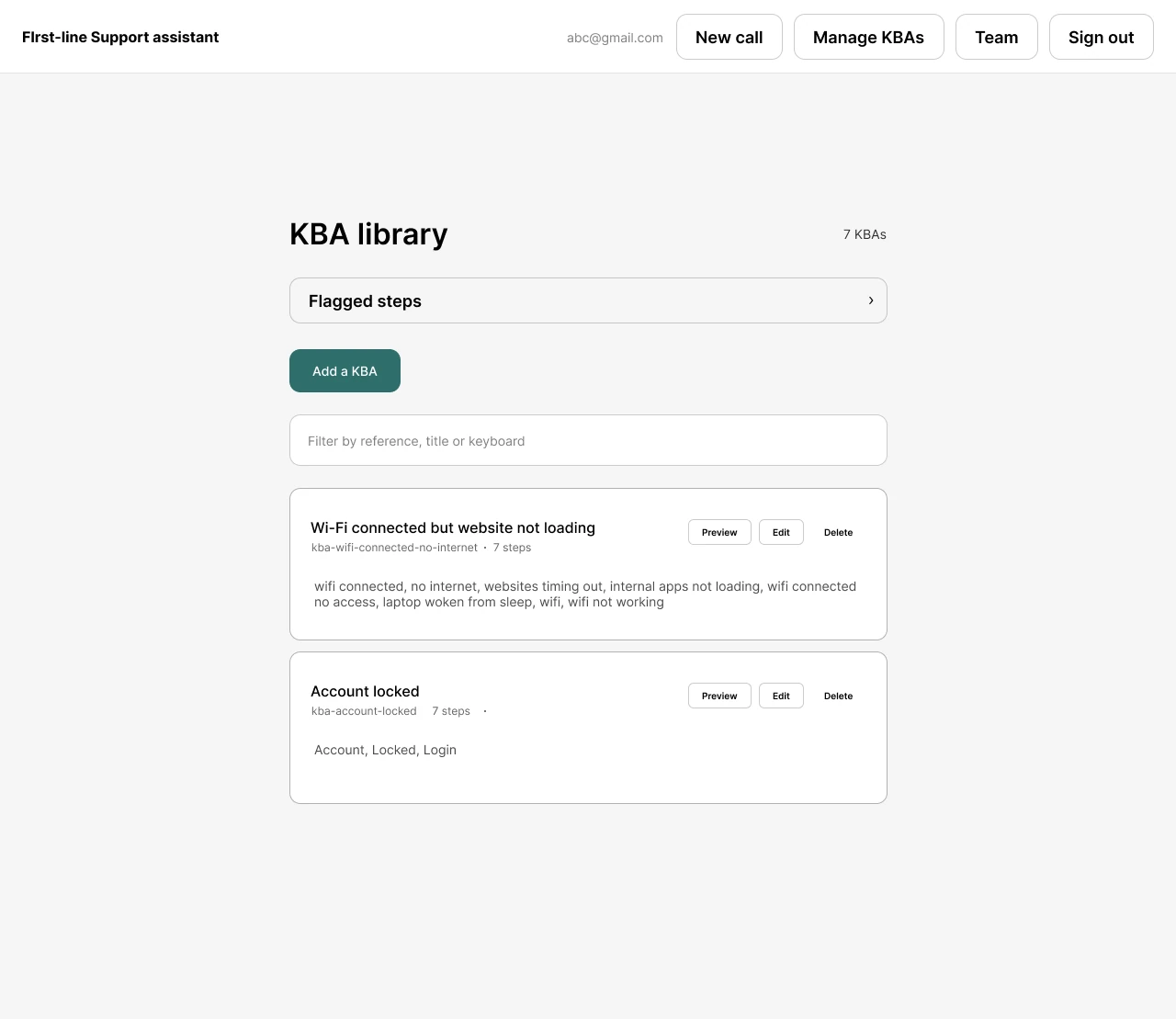
KBA Library
Admins manage the organization’s approved troubleshooting procedures.
03
Organization & Access
Different users receive different levels of access depending on their role.
07 · The Core Workflow
From a user’s words to a reviewed ticket.
Step 1
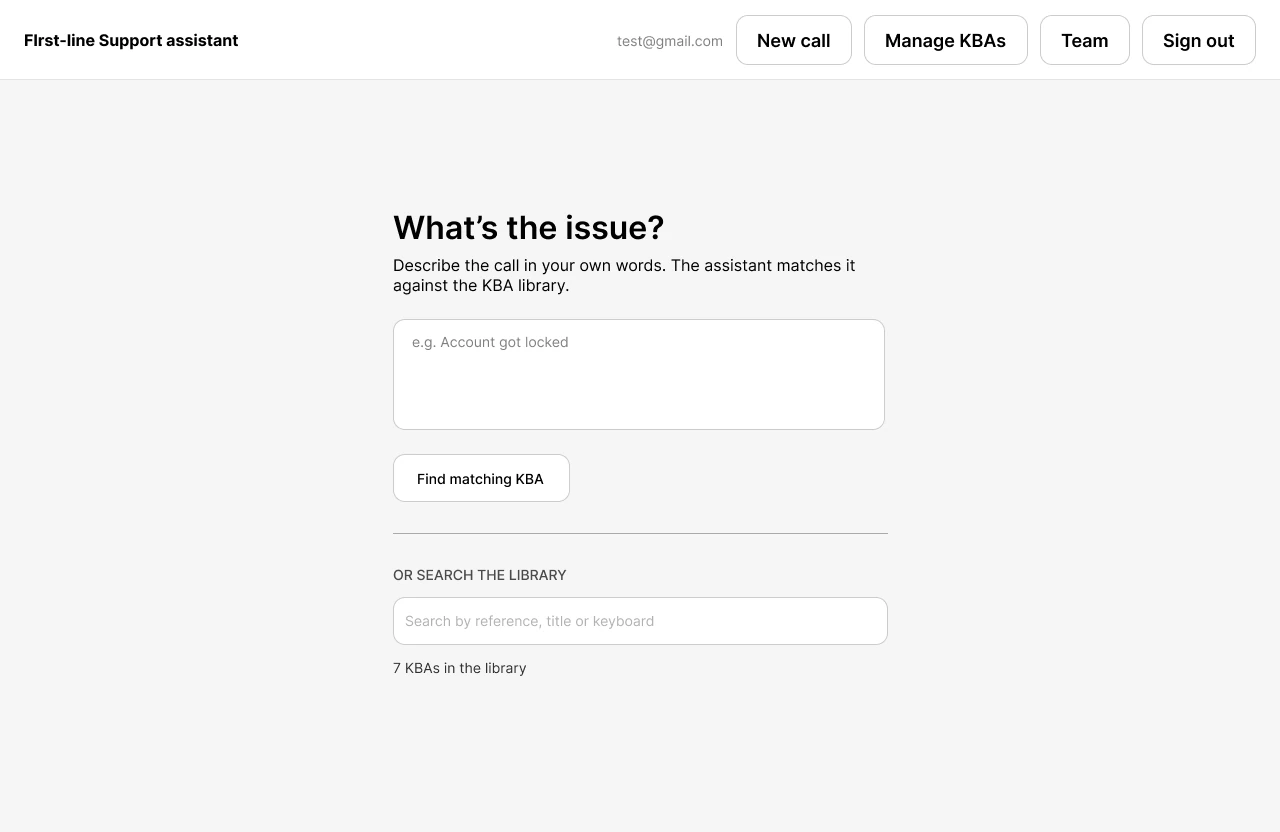
Describe the issue
Instead of forcing the analyst to know the exact KBA title, they start with the language they already have — for example:
“User’s laptop is connected to Wi-Fi but cannot access the internet.”
The system searches the available procedures and surfaces potential matches.
Step 2
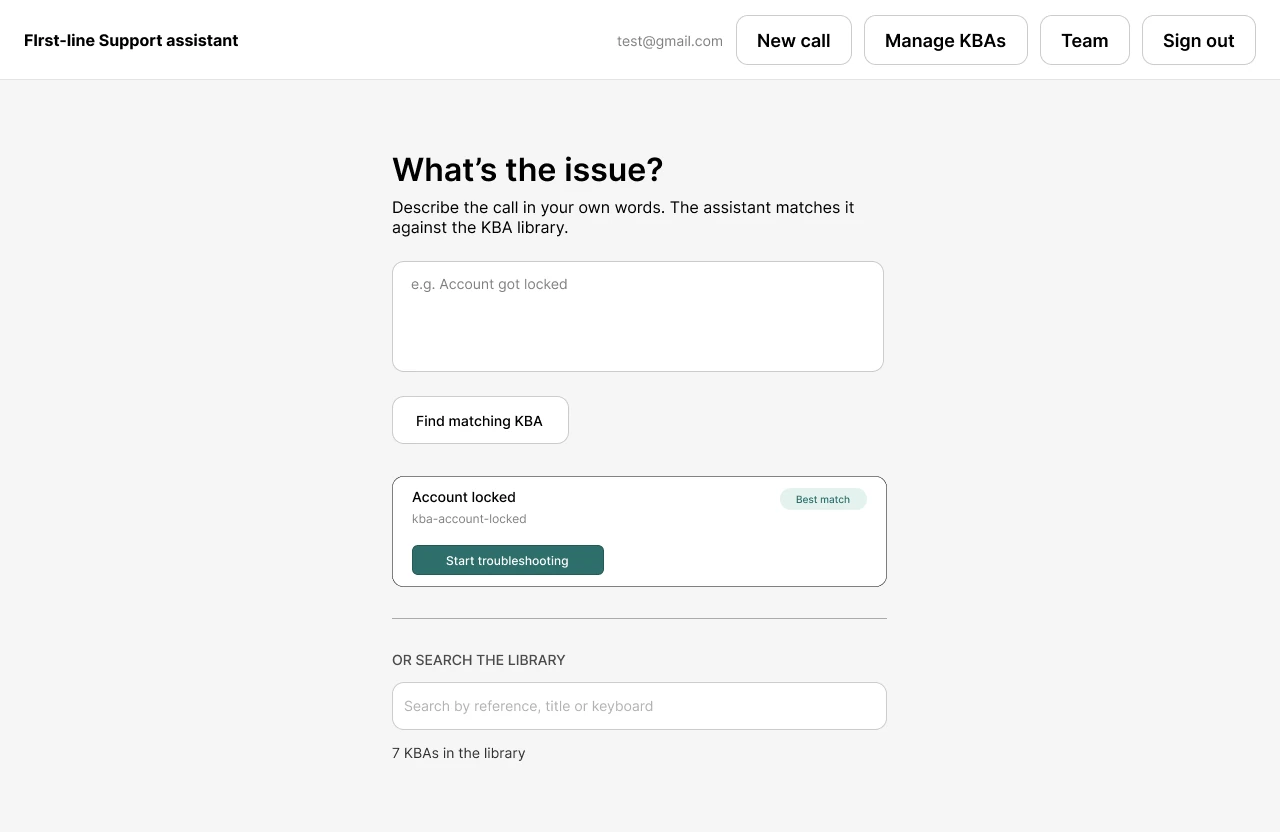
Review the suggested KBA
The strongest match is presented first. But it isn’t treated as truth. Other matching KBAs remain visible, and the analyst can search the entire library manually.
A recommendation should be a shortcut, not a gate. If the system silently provides one answer, analysts may learn to trust it without questioning it. Keeping alternatives visible provides a recovery path when the match is wrong.
Step 3
Troubleshoot one step at a time
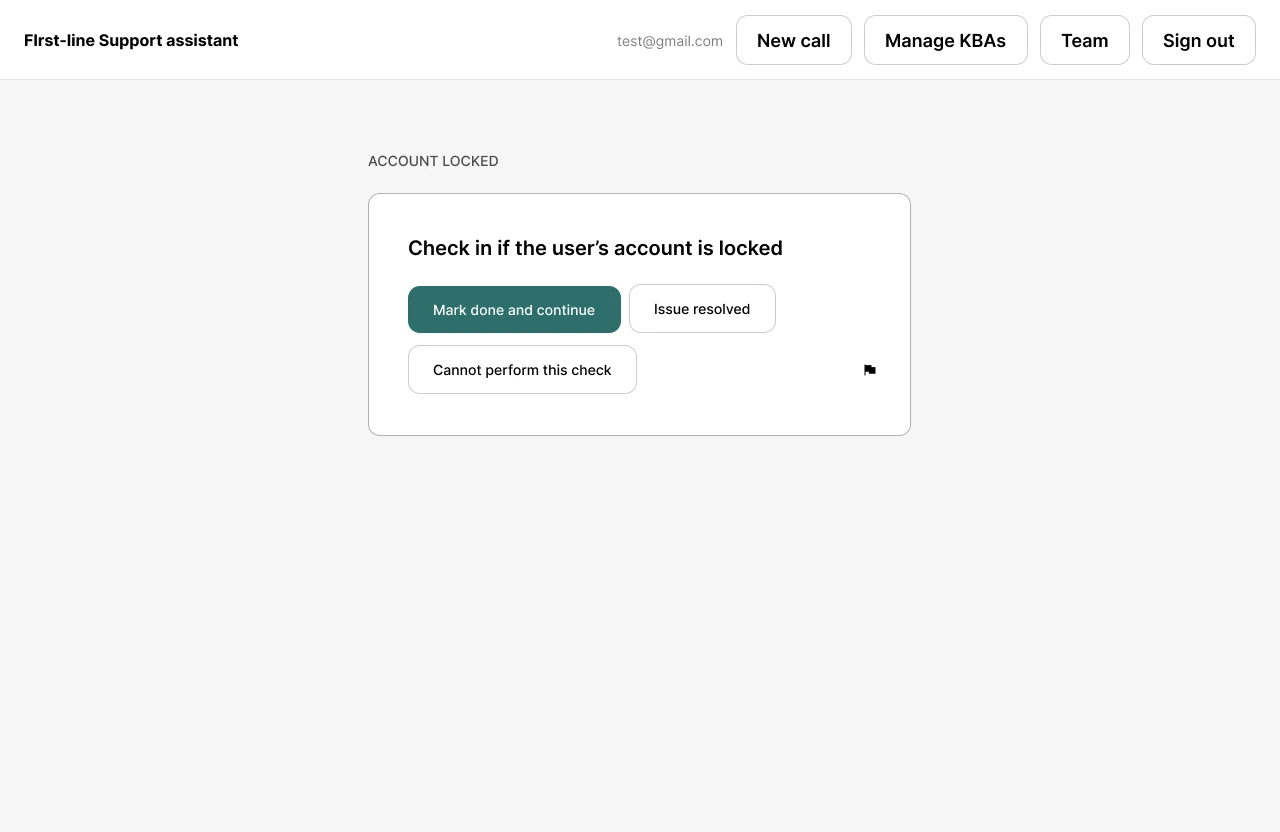
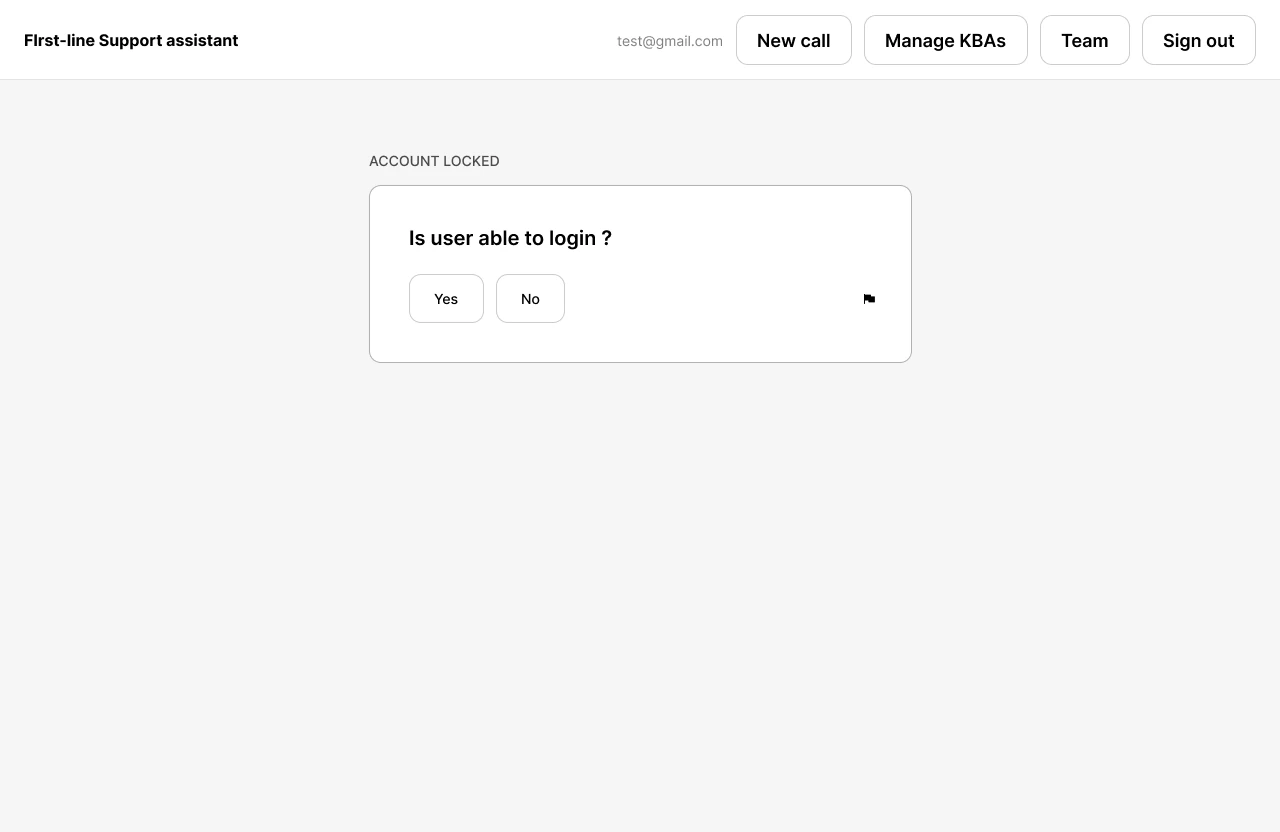
Once a procedure is selected, the analyst doesn’t need to repeatedly switch between the call and a long document. The procedure becomes an interactive checklist. Each step contains:
The analyst works through the procedure while talking to the user. This transforms the KBA from a static document into an active tool.
A small decision with a big impact
What happens if the issue is solved halfway through?
A traditional procedure might force the analyst to continue reading through unnecessary steps. I designed an explicit “Issue resolved” action at every troubleshooting step. If the second step solves the problem, the analyst can stop. But there is an important asymmetry.
Resolve early
Allowed
Escalate early
Not allowed
An analyst can stop because the problem is solved. They cannot skip required troubleshooting and immediately escalate — because an incomplete escalation recreates the exact problem the product is trying to solve: second-line receives an incomplete ticket and sends it back.
Step 4
Generate the ticket
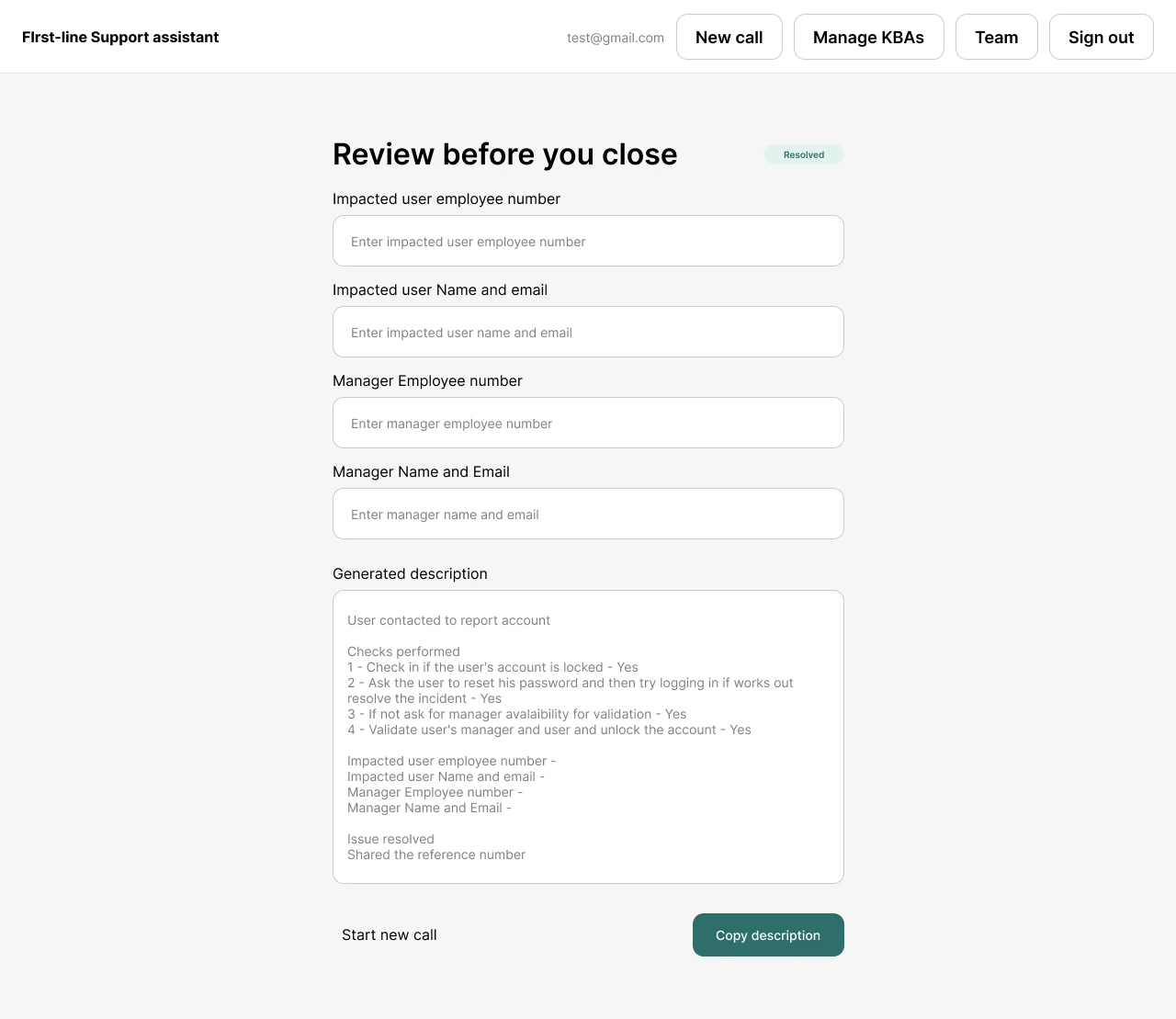
At the end of the troubleshooting flow, the product converts what actually happened into a structured ticket description. Instead of asking the analyst to remember “What did I do?”, the system already knows which steps were completed. The generated description follows a consistent structure.
Example
Issue reported
User unable to access the internet despite being connected to Wi-Fi.
Troubleshooting performed
- Confirmed Wi-Fi connection.
- Checked device network status.
- Restarted network adapter.
- Tested connectivity.
Resolution
Issue resolved after restarting the network adapter.
Additional information
Relevant information captured during troubleshooting.
The important detail
The ticket isn’t automatically trusted.
The generated description is presented for analyst review. This creates a human verification point before information leaves the product.
The goal isn’t “AI writes the ticket.” The goal is:
The system removes repetitive documentation work while keeping the analyst accountable for accuracy.
08 · Why I Didn’t Put AI Everywhere
AI at ingestion, not during the call.
This was one of the most important decisions in the project. The obvious solution would have been:
User describes problem → AI finds KBA → AI decides what to do → AI writes ticket.
It sounds powerful. It also introduces several risks. A support ticket is not creative writing. If the system invents a troubleshooting step or incorrectly claims something was checked, the output can actively damage the support workflow.
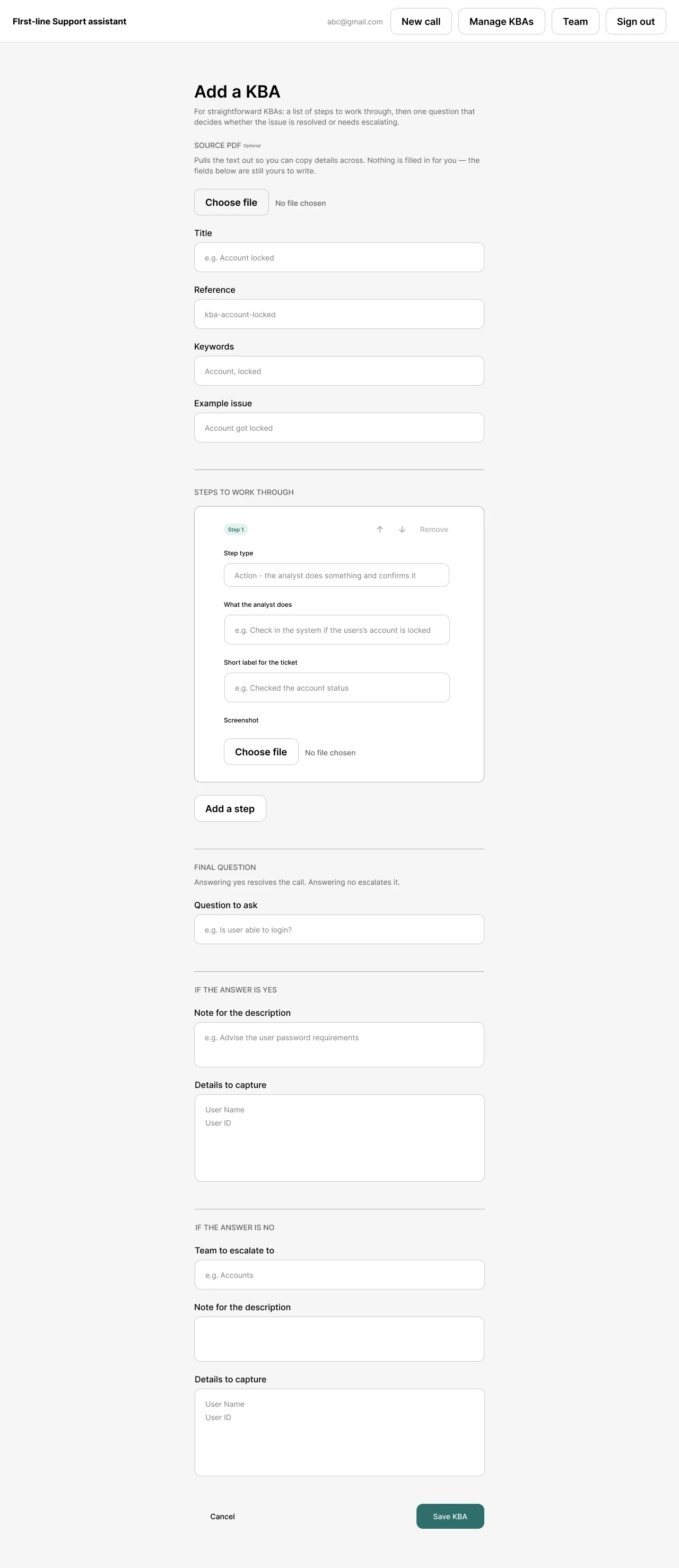
So I separated where AI is useful from where determinism is more valuable. Instead of using AI during every support interaction, I designed the AI layer around KBA ingestion. When an admin uploads a KBA:
This means every analyst receives the same reviewed procedure. The model doesn’t independently rewrite the process every time an analyst opens it. Parsing happens when the document enters the library, followed by mandatory admin review before publication.
09 · Designing for Failure
A good support tool shouldn’t only optimize the happy path.
I deliberately designed recovery paths into the experience.
Wrong KBA?
Search the library or choose another suggested procedure.
Issue solved early?
Exit the procedure through “Issue resolved.”
Procedure incomplete?
The system doesn’t allow an incomplete escalation.
Generated description needs correction?
The analyst edits it before using it.
Network unavailable?
Once the KBA is loaded, the active troubleshooting flow runs client-side.
Offline-first flow
Support calls are time-sensitive. A network request in the middle of a troubleshooting procedure creates another dependency. So once the procedure has been loaded, the matching, sequencing, branching and ticket-description template can run client-side without requiring another network request. This also influenced the decision not to put a live AI API call in the critical troubleshooting path.
These decisions reduce the number of ways the tool can create a new support problem while trying to solve an existing one.
10 · The KBA Library
The knowledge base is the foundation, so permissions follow roles.
Analyst
Can
- Search KBAs
- View procedures
- Execute troubleshooting flows
- Generate ticket descriptions
Cannot modify the organization’s procedures.
Admin
Can
- Search KBAs
- Create procedures
- Edit procedures
- Upload KBA documents
- Review AI-generated structures
- Publish approved procedures
Keeps troubleshooting standardized while still allowing the knowledge base to evolve.
A shared tool, not a personal tool
The unit of the product isn’t the analyst. It’s the support organization.
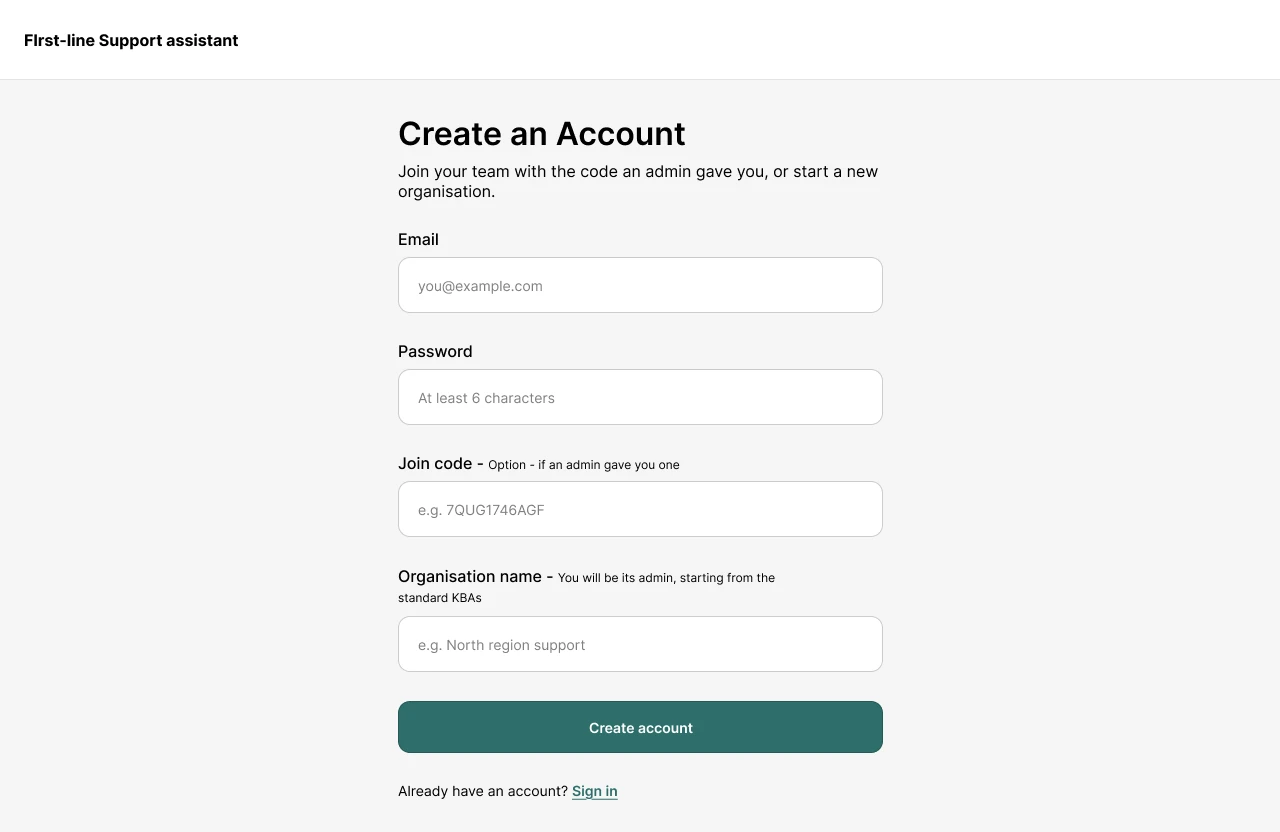
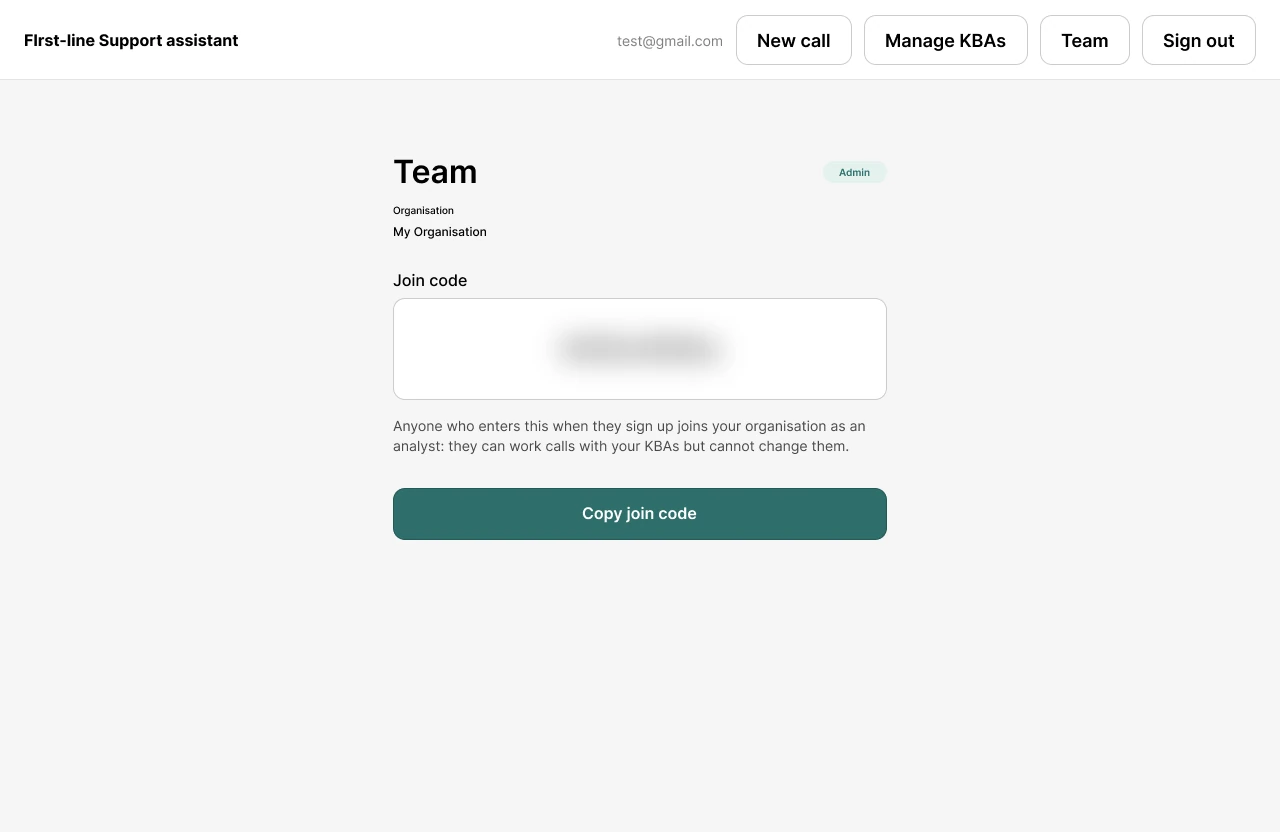
One of the biggest product-thinking moments came from the data model. My first implementation gave every new signup their own organization. Technically, it worked. But conceptually, it was wrong — two analysts working on the same support desk could sign up and end up with two completely separate knowledge bases.
That changed the account model. A new user without an invitation creates an organization and becomes its admin. A user joining through an organization code becomes an analyst with access to that organization’s shared library. The underlying data is isolated between organizations at the database level.
11 · Privacy as a Product Decision
What the system deliberately doesn’t remember.
I deliberately chose not to store support-session information in the first version. The system stores KBA procedures. It does not store ticket content, session history, or individual analyst metrics.
Benefits
- Less sensitive customer information stored
- Smaller breach surface
- No session-retention workflow
- No need for individual deletion workflows
Cost — the product cannot currently provide
- Resolution-rate analytics
- Analyst performance analytics
- Historical session review
- Handle-time reporting
I treated this as a product boundary rather than quietly adding tracking later.
12 · What I Actually Built
This wasn’t only a Figma concept.
I built a working multi-user prototype with:
Call Workspace
- Issue input
- KBA matching
- Step-by-step troubleshooting
- Screenshots
- Step completion
- Early resolution
- Structured ticket generation
KBA Library
- Search
- Procedure creation
- PDF ingestion
- Admin editing
- Shared organizational library
Organization System
- Authentication
- Organization creation
- Join codes
- Analyst/admin roles
- Organization-level data isolation
The prototype was built solo, including the technical implementation.
13 · Technical Strategy
Three architectures considered.
| Approach | Advantage | Cost / Risk |
|---|---|---|
| External AI API | Better language understanding and generation | Network dependency, API cost, hallucination risk |
| Deterministic client-side system | Predictable, fast, reliable | Less intelligent matching |
| Local model | Greater data control | Model quality and implementation complexity |
What shipped
Deterministic matching + client-side troubleshooting + templated ticket generation
The reason wasn’t that AI wasn’t useful. It was that the most important output — the escalation ticket — needed to be predictable. The AI-assisted version remains a future extension, with deterministic generation acting as the fallback.
14 · What I Would Measure
Proposed success metrics, not measured results.
The current prototype has not been validated with real analysts.
Efficiency
- Time required to find the correct KBA
- Time spent completing a troubleshooting flow
- Time spent writing the final ticket
Quality
- Percentage of escalations containing all required information
- Second-line passback rate
- Missing-information rate
Usability
- Time to complete a troubleshooting procedure
- Number of analyst corrections to generated tickets
- Procedure abandonment rate
- Successful task completion
Trust
- Percentage of suggested KBAs accepted
- Frequency of analysts switching to another KBA
- Percentage of generated descriptions edited before submission
I would measure these. I am not claiming the prototype has already improved them.
15 · What I Would Test First
The next step isn’t adding more features.
It is putting the prototype in front of 2–3 first-line analysts and observing real support scenarios.
Tasks
- 1“Find the correct procedure for this user’s problem.”
- 2“Troubleshoot the issue using the assistant.”
- 3“The problem is resolved halfway through. Show me what you would do.”
- 4“Escalate this issue to second line.”
- 5“Review the generated ticket before submitting it.”
I would specifically watch for
- Where they hesitate
- Whether they understand why a KBA was suggested
- Whether they trust the suggested procedure too quickly
- Whether the step-by-step flow interrupts their conversation
- Whether they understand “issue resolved”
- What information they still expect to add manually
- Whether the generated ticket actually matches their expectations
16 · Current Limitations
This is a prototype, not a validated production product.
No real-user usability testing yet
The problem comes from firsthand experience, but the solution hasn’t yet been observed in use with real analysts.
Procedures are currently linear
The authoring interface doesn’t yet support complex branching procedures.
Matching is basic
The current matcher relies on keyword overlap rather than genuine semantic understanding.
Join codes don’t expire
A production implementation would need expiring codes or admin approval.
AI ticket generation isn’t implemented
It is designed as a future layer and would require strong validation and a deterministic fallback.
These aren’t things I would hide from a recruiter. They define the next design questions.
17 · What I Learned
The hardest design problem wasn’t the interface.
It was deciding what the product should not do. There is a natural temptation with AI products to automate as much as possible. But in a support environment, being wrong can be more expensive than being slightly slower. That led me to three principles I would carry into future products:
01
Automation needs boundaries
Don’t automate a judgment simply because the technology can.
02
The system should make the correct action easy, not force it blindly
Suggestions, alternatives and human checkpoints create recoverability.
03
Product architecture is part of UX
The decision to make the organization — not the individual — the core unit changed the entire product experience.
18 · The Bigger Idea
At first glance, this project looks like a KBA search tool. It isn’t. The larger idea is:
Turn organizational knowledge into an executable workflow.
A traditional knowledge base says
“Here is the information.”
This product asks
“How can we help someone correctly execute that knowledge under pressure?”
Final reflection
The strongest moment in the project wasn’t a polished screen. It was discovering that my first account model was wrong. The prototype technically worked, but it didn’t represent how a support organization actually operates. That forced me to step back from the interface and think about:
- Who is the product actually for?
- What is shared?
- Where does authority live?
- What should the system remember?
- What decisions should remain with the analyst?
Those questions changed the product more than any visual redesign. And that is ultimately what I wanted this project to demonstrate:
I don’t just design screens. I try to understand the system behind the screen, identify where the real friction comes from, and decide where technology should — and should not — intervene.